> For the complete documentation index, see [llms.txt](https://guide.signspace.com/llms.txt). Markdown versions of documentation pages are available by appending `.md` to page URLs; this page is available as [Markdown](https://guide.signspace.com/en/secure-communication-secure-mail.md).
# Secure Communication (Secure Mail)
With the conversation functionality, you can share, receive, and process sensitive or confidential information securely — without the risks associated with email. Secure communication uses strong authentication, a secure connection, and clear retention periods to ensure that information is available only to the intended people and is removed when no longer needed.
> ### **What can secure communication be used for?**
>
> Conversations can be used as secure mail for the following purposes:
>
> #### **Collecting information securely**
>
> Create a secure conversation using strong authentication and send an invitation to the recipient whose information you need. The recipient authenticates strongly and can provide the requested information or files safely through the conversation.
>
> #### **Sending sensitive information**
>
> You can share confidential files, images, or other content through the conversation without the vulnerabilities of email.
>
> #### **Conducting confidential discussions**
>
> You can hold conversations dealing with sensitive topics or confidential details related to a collaboration process. All messages, attachments, and comments remain in a protected view.
### **How to create a secure conversation**
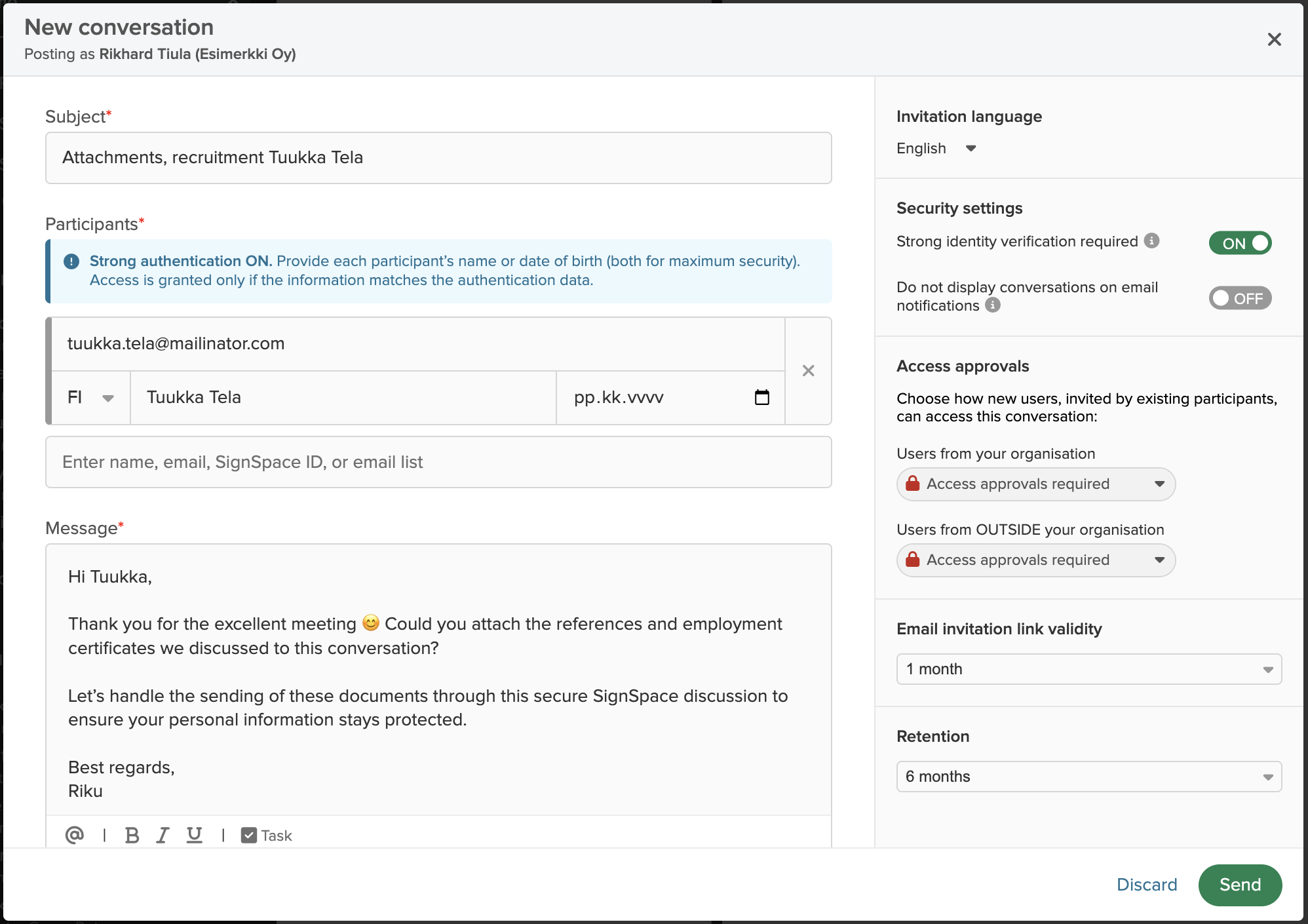
1. Select **+ New → Conversation**
2. Add recipients
3. Set the security level to **Strong authentication**
4. For confidential conversations, select: **Do not show conversations in email notifications**
5. Set a retention period for the conversation
6. Write your message and add attachments if needed
7. **Send** the invitation link to the recipients
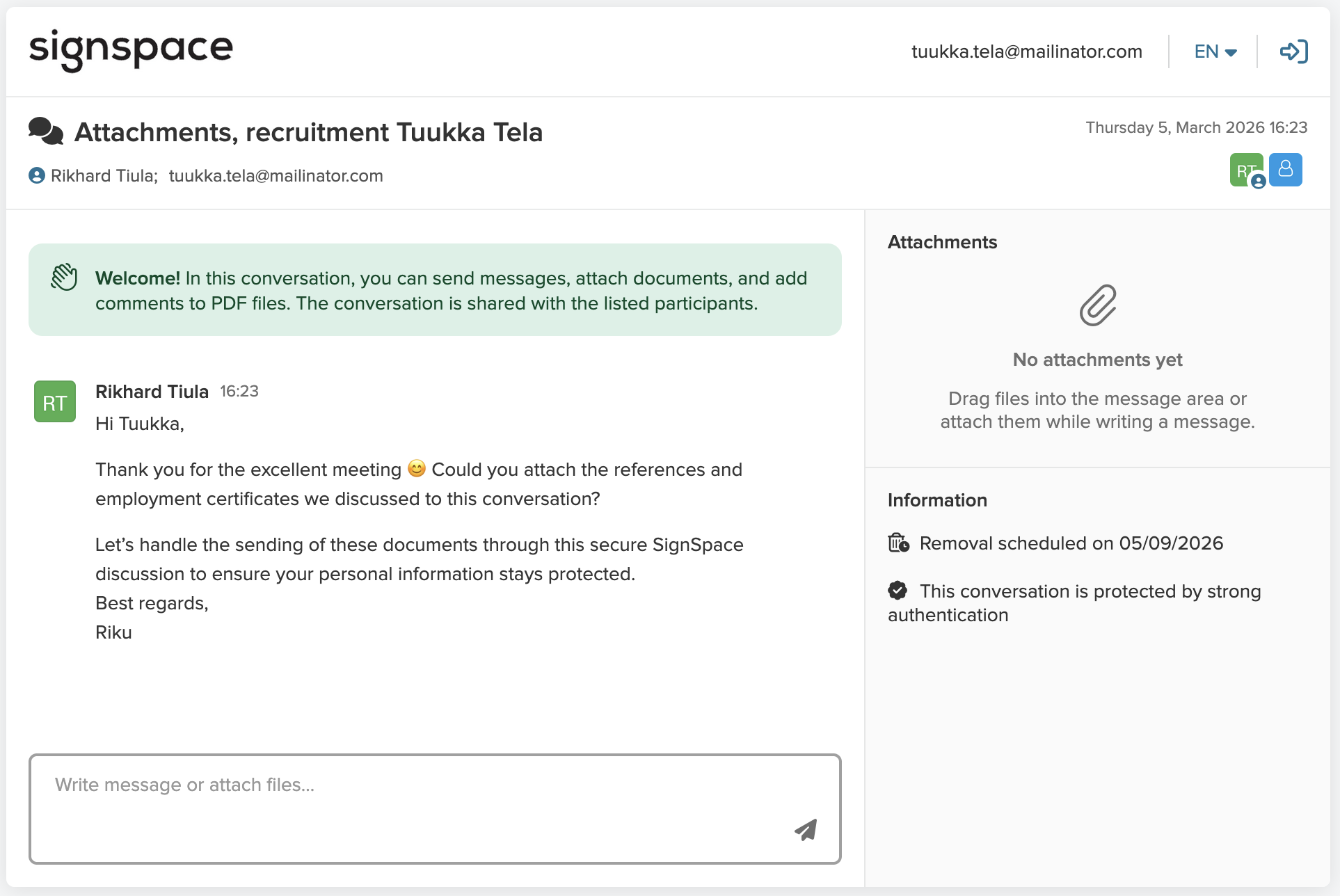
Those invited can join the conversation directly from the email link. The recipient must authenticate strongly before accessing the content.
After successful authentication, the recipient can open and join the conversation.
If the invited person has a SignSpace account, they will be directed to log in and authenticate strongly if this hasn’t been done before.
{% hint style="info" %}
**Please note** that the name information entered in the conversation creation form must match the name returned during strong authentication. If a date of birth is also defined for the invitee, it must also match the authentication details.
If the information does not match, the recipient cannot join the conversation. In this case, the sender can correct the name or date‑of‑birth details in the **Members** menu of the conversation and resend the invitation.
{% endhint %}
### **How to collect information securely**
You can use conversations instead of forms or email when you need to collect information or documents from a customer.
Do this:
1. Create a new conversation and choose **Strong authentication**
2. Send the conversation invitation to the recipient
3. The recipient opens the link and authenticates
4. They upload the required information or documents into the conversation
5. You receive a notification when the information has been delivered
**Benefits:**
* All data transfer occurs under strong authentication
* The recipient does not need to register
* Delivered materials are stored in one secure location
### **Send sensitive data**
Through conversations, you can send, for example:
* personal data
* contract drafts
* health information
* financial information
* HR‑related information
* other confidential documents
The conversation is protected by a passcode or strong authentication.\
You can also define a clear retention period, after which the conversation is automatically deleted.
### **Handle confidential matters in secure conversations**
A secure conversation is well-suited for situations where multiple parties participate:
* confidential working group discussions
* negotiations
* handling sensitive issues
* customer interactions
* coordination between responsible parties
All messages, comments, and attachments are displayed in one clear view, making collaboration secure and transparent.
### **Security level and data protection**
* Conversations can be protected with a **passcode (default)** or **strong authentication** (e.g., bank credentials or mobile ID).
* You can set a retention period after which the conversation is permanently deleted for all participants.
* The functionalities have been security‑tested by an external security service and verified as safe.
* All communications are encrypted.
* A participant cannot see any content other than what they have been invited to.
* Strong authentication is an additional paid feature, charged according to the price list.
{% hint style="info" %}
**NOTE**: [Trusted Admins](/en/managing-your-organisation-account/authorise-access-to-organisation-account-information.md) of the sender’s organisation, authorised by the organisation’s official representatives, have access to all content within the account, including conversations.
{% endhint %}
### **More information**
The conversation functionality is described in more detail on this [instruction page](/en/preparation/prepare-contract-for-signing.md).